Vulnerability Scanning
Vulnerability scanning analyzes container images to identify known security issues in the operating system packages or libraries they contain. Satama has an integrated tool, Trivy, to perform these scans automatically or on-demand.
Enable Automatic Vulnerability Scanning
You can enable automatic scan of images on push.
- Inside the project, navigate to Configuration tab.
- Locate the Vulnerability scanning section.
- Check box in front of Automatically scan images on push
If enabled, every time a user pushes an image, Satama automatically scans it for CVEs. If disabled, user can manually trigger scans.
Run Manual Scan
You can run manual scan for individual images.
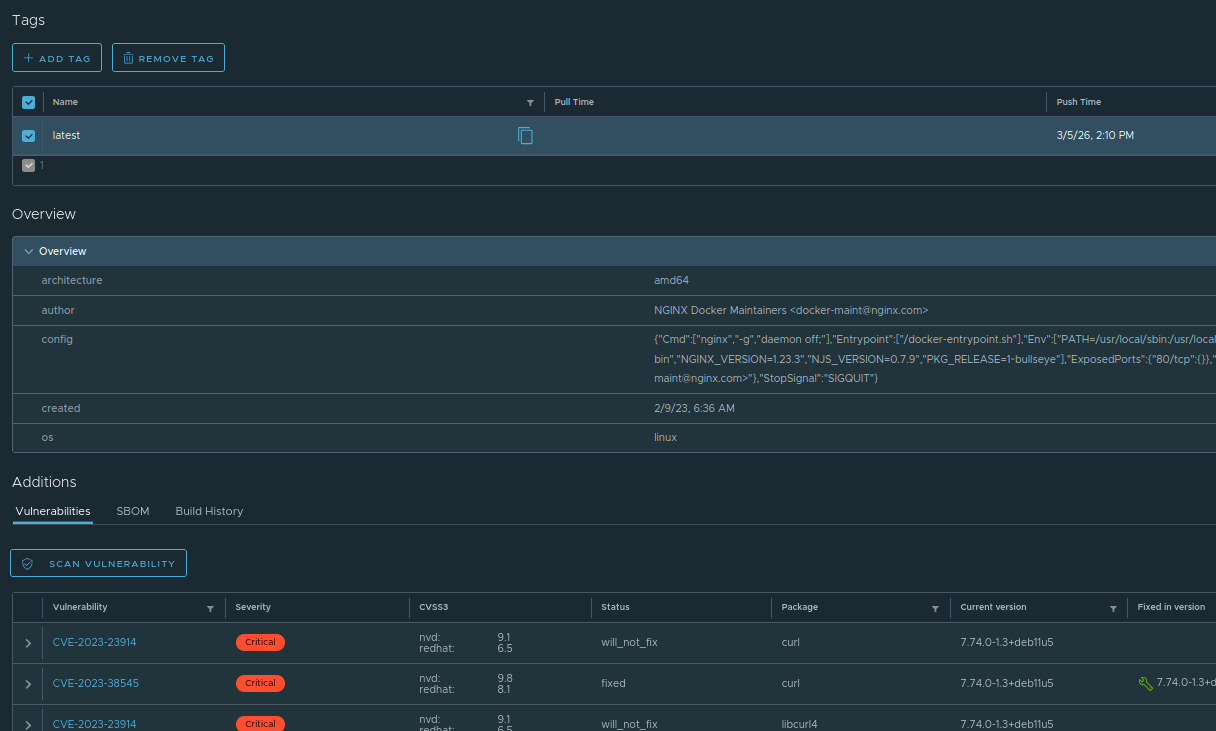
- Click on the repository and select the image you want to scan.
- Go to Additions section.
- Click on Vulnerabilities tab.
- You can start scanning by clicking on scan vulnerability button.
Check the Scan Result
Once scan is completed, all CVEs will be displayed under Vulnerabilities tab. Satama displays:
- Number of vulnerabilities
- Severity levels (Critical, High, Medium, Low)
- Affected packages
- Recommended fixes