Tag Immutability
Tag immutability prevents container image tags from being overwritten or modified after they are pushed.
Normally, users can push a new image with the same tag (for example latest). This can cause issues because deployments may use different image versions without noticing.
Tag immutability ensures that once a tag is created, it cannot be changed.
Benefits
- Prevents accidental image overwrites
- Improves deployment consistency
- Strengthens supply chain security
- Ensures traceability of image versions
How to Configure Tag Immutability
To configure tag immutability, open the Project in Satama and go to Policy tab.
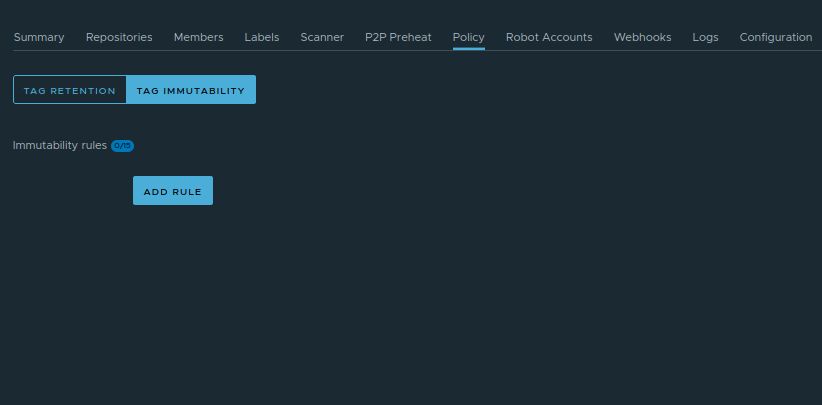
Click on Tag Immutability section. Click on Add rule. A pop-up window will open
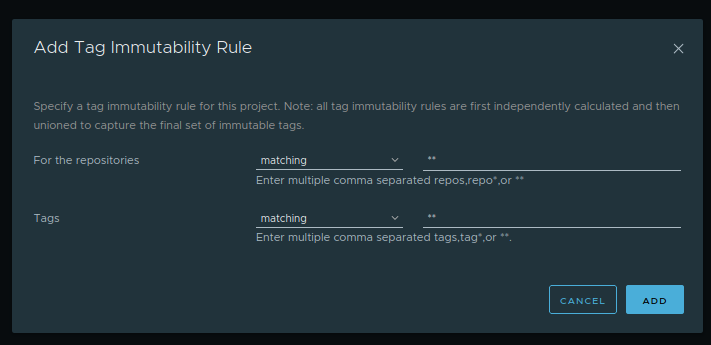
Create a rule specifying which tags should be immutable.