Ephemeral storage
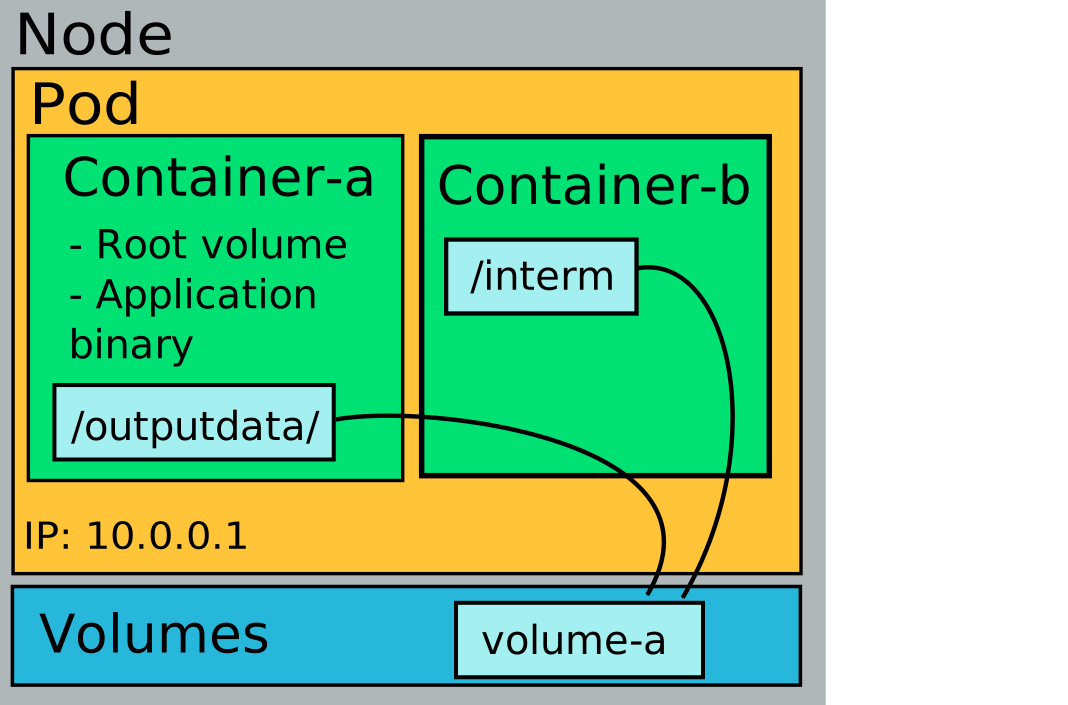
When local ephemeral (temporary) storage is needed, an emptyDir volume should be created. The volume is local to the node on which the Pod is running; in Rahti this is a local SSD disk. The volume can be shared across several containers in the same Pod, and it is the fastest filesystem storage available in Rahti. However, an emptyDir volume is deleted when the Pod is deleted or migrated to another node. It is declared directly in the Pod definition, as in the following example:
apiVersion: v1
kind: Pod
metadata:
  name: my-app
  labels:
    app: my-application
spec:
  volumes:
  - name: volume-a
    emptyDir:
      sizeLimit: 2Gi
  containers:
  - name: container-a
    image: almalinux:10
    command: ['sh', '-c', 'while true; do sleep 50; done']
    volumeMounts:
    - mountPath: /outputdata
      name: volume-a
  - name: container-b
    image: almalinux:10
    command: ['sh', '-c', 'while true; do sleep 50; done']
    volumeMounts:
    - mountPath: /interim
      name: volume-a
Here both containers mount the same volume, so container-a sees the shared data under /outputdata and container-b sees it under /interim.
Data written without a volume
If a container writes to a path that is not backed by any volume (for example /tmp, or the application's working directory), the data is stored in the container's writable layer. Like an emptyDir volume, the writable layer is stored on the node's local disk. However, it has some important limitations:
- The data is lost when the container is restarted, for example after a crash or an
OOMKilledevent. It is also lost when the Pod is deleted or moved to another node. - The data is visible only to that container and cannot be shared with other containers in the same Pod.
If your application needs temporary storage that should survive container restarts or be shared between containers in the same Pod, mount an emptyDir volume at the required path instead of relying on the writable layer. Use persistent storage for data that must be retained beyond the lifetime of the Pod.
Using memory as the storage medium
An emptyDir volume can be made even faster by using memory (tmpfs) as the storage medium instead of the local disks. The size of the data stored in a memory-backed emptyDir is counted towards the Pod's memory usage, which means the maximum size of the data that can be stored is equal to the Pod memory limit (i.e. the sum of the memory limits of the containers inside the Pod). If the Pod exceeds its memory limit, Kubernetes may terminate one or more containers with an OutOfMemory (OOMKilled) status. This can happen even if the application itself is not using too much memory, because the contents of the tmpfs volume contribute to the limit. You can create a memory-backed emptyDir by adding the medium: Memory field under emptyDir. It is recommended to configure sizeLimit to a value lower than the Pod memory limit.
apiVersion: v1
kind: Pod
metadata:
  name: test-pod
spec:
  containers:
  - image: busybox:stable
    name: test-container
    command: ['sh', '-c', 'while true; do sleep 50; done']
    volumeMounts:
    - mountPath: /cache
      name: mem-cache-volume
    resources:
      limits:
        memory: 2Gi
  volumes:
  - name: mem-cache-volume
    emptyDir:
      sizeLimit: 500Mi
      medium: Memory