SD Connect: bucket names conversion
Buckets (main folders) created with SD Connect before 28 September 2026 need to be converted to work correctly with the updated version of the services. The SD Connect Conversion Tool, available via graphical user interface or command line, converts buckets names while preserving the data and restoring their functionality.
The action you need to take depends on the label displayed in the SD Connect user interface next to your bucket:
- Urgent: convert the bucket as soon as possible to restore data access.
- By the end of 2026: the data remains accessible, but the bucket name and file format should be converted by the end of 2026.
If your project contains both types of buckets, convert the Urgent buckets first.
On this page:
- 1. Before you start
- 2. Check bucket label
- 3. Converted bucket names
- 4. Choose the appropriate conversion method
- 5. After conversion
1. Before you start
Plan the conversion with the other members of your CSC project.
- Agree on when the conversion will take place.
- Do not upload new files while the conversion is in progress.
- If possible, delete files and buckets that you no longer need before starting the conversion.
- Check the labels and sizes of the buckets that need to be converted.
- If you need support for planning or during the conversion, please contact servicedesk@csc.fi or join one of the online support sessions (register in English or in Finnish
-
Projects with more than 5 TB
If your project contains more than 5 TB of data in Urgent buckets, contact the CSC Service Desk before starting the conversion. Converting these buckets is network intensive and may require additional planning.
2. Check bucket label
2.1 Urgent
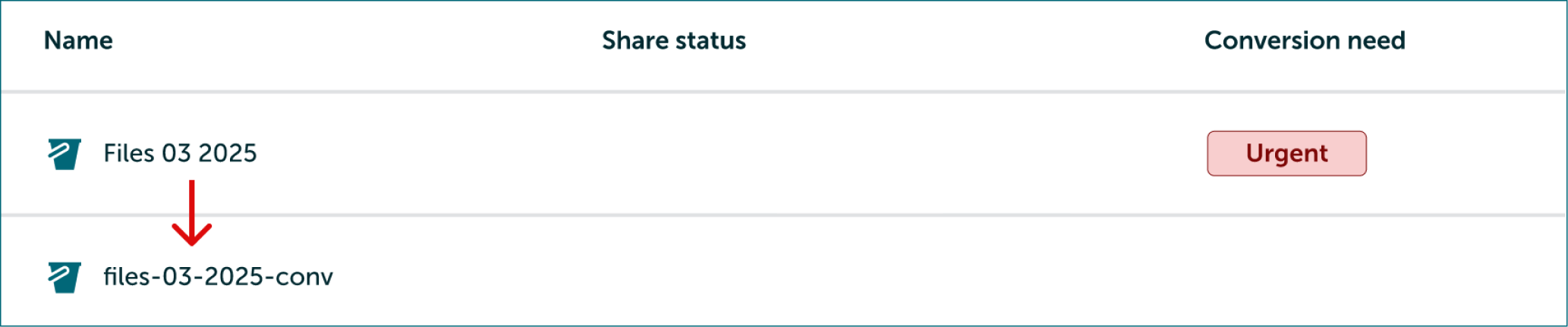
Buckets labelled Urgent should be converted as soon as possible.
Before conversion:
- Files in the bucket cannot be accessed.
- Sharing permissions are not visible.
The conversion creates a new bucket with compatible name adding the suffix -conv and copies the files to it. It also restores the bucket size and sharing permissions.
This is a network-intensive operation. Large conversions should be planned in advance to avoid overloading CSC storage infrastructure.
-
Projects with more than 5 TB
If your project's data size exceeds 5 TB, please contact us for support before starting the conversion. Buckets labelled Urgent are given priority in Helpdesk support queues.
2.2 By the end of 2026
It is advised to convert Buckets labelled by the end of the year.
Before conversion:
- Files can still be accessed and downloaded.
- Sharing permissions are not visible.
- The bucket and file size are displayed as zero.
If a bucket name contains uppercase letters or underscores, the conversion creates a compatible name and adds the suffix -conv. If the name is already fully compatible, it remains unchanged. All buckets can be converted to restore the correct file and bucket sizes and ensure compatibility with future versions of the service. This conversion is not network intensive.

3. Converted bucket names
During conversion, bucket (main folders) names are automatically adjusted to meet the current SD Connect naming requirements. When a bucket name contains unsupported characters or does not meet the naming requirements, the tool modifies the name and adds the suffix -conv.
The tool applies the following naming rules as needed:
- Spaces are replaced with hyphens (-).
- Names longer than 63 characters are shortened.
- Uppercase letters are converted to lowercase.
- Underscores (_) are replaced with hyphens (-).
- If the resulting name already exists, a unique string is added to avoid duplicate bucket names.
Note, these naming rules apply only to bucket names (main level folders created with SD Connect), they do not apply to files or folders stored inside the buckets.
| Label | Why conversion is needed | Example (Old name -> New bucket name) | Name Changes |
|---|---|---|---|
| Urgent | Regain data access | non-compatible name with space → non-compatible-name-with-space-conv |
Spaces are replaced with hyphens (-). Suffix -convis added to the end. |
| Urgent | Regain data access | non-compatible-name-longer-than-sixty-three-characters-for-conversion-example → non-compatible-name-longer-than-sixty-three-characters-for-c-conv |
Name shortened to 63 characters. Suffix -convis added to the end. |
| Urgent | Regain data access | In case of similar bucket names, for example: Non-compatible name and non-compatible name → non-compatible-name-conv and non-compatible-name-234-conv |
Two buckets can't have the same name. Tool adds random string to other's bucket name. |
| By the end of 2026 | Fix bucket and files size, ensure compatibility with future versions | Partially_compatible_name → partially-compatible-name-conv |
('P') Uppercase letters are replace with lower case ('p') (_) are replaced with hyphens (-). Suffix -convis added to the end. |
| By the end of 2026 | Fix bucket and files size, ensure compatibility with future versions | cscproject-200346-fully-compatible-name |
cscproject-200346-fully-compatible-name |
4. Choose the appropriate conversion method
Choose the method based on bucket's label and size. The SD Connect Conversion tool is available for download via graphical user interface (for files up to 10 GB), or as part of the SD Command line tools on Roihu for large conversions. Please note: while Roihu is not suitable for processing sensitive data, it can be used to run the Conversion Tool, providing faster conversions through CSC's network.
| Bucket Tag | Data Size | Recommended Action | User Guide |
|---|---|---|---|
| Urgent | Up to 1 TB | Use the SD Connect Conversion Tool user interface on your local computer. This is a network-intensive operation. On a standard home internet connection, converting 25 GB may take around 2 hours. | Link |
| Urgent | 1–4 TB | Use the SD Connect Conversion CLI on Roihu. | Link |
| Urgent | 4–50 TB | Verify that sufficient quota is available to create a copy of the bucket with compatible name. Use the SD Connect Conversion CLI on Roihu and convert a few buckets at a time. This is a network-intensive operation. Larger projects require advance planning to avoid overloading CSC storage infrastructure and to ensure a smooth conversion. | Link |
| Urgent | More than 50 TB | Contact CSC support to plan the conversion. | servicedesk@csc.fi (subject:SD Connect) |
| By End of 2026 | Up to 1 TB | Use the SD Connect Conversion Tool user interface on your local computer. | Link |
| By End of 2026 | More than 1 TB | Use the SD Connect Conversion CLI on Roihu. | Link |
5. After conversion
After the conversion is complete, a migration report (file.json) will appear in the bucket. If you encounter any issues, download the report from SD Connect and send it to servicedesk@csc.fi (subject: SD Connect) for troubleshooting.
Next, the conversion tool asks you to verify that the bucket size and number of files are correct. After verification, the tool asks you to confirm the deletion of the original bucket.
The cleanup depends on the bucket label:
-
Urgent: The original bucket is deleted and only the new
-convbucket is kept. This frees the storage space used by the original bucket. -
By the end of 2026: The files remain in the existing bucket. The conversion tool removes only the obsolete technical information associated with the bucket.
-
Warning
Always verify that the converted data is complete and accessible before confirming the deletion of the original bucket. Deleting a bucket permanently removes all data it contains.
When conversion creates both an original and a converted bucket, keeping both consumes additional CSC storage space.