TURBOMOLE
TURBOMOLE is a fast and robust quantum chemistry program package with very efficient implementations of various computational methods (HF/DFT/MP2/CC). Properties both for ground and excited states can be obtained. TURBOMOLE has been designed for efficient study of large systems.
Available
- Roihu-CPU: 8.0
License
- You may use the Software exclusively for non-profit research purposes.
- Only users from academic (i.e. degree-granting) institutes are allowed to use the Software.
Usage
Initialise TURBOMOLE environment:
On Roihu, jobs must be submitted from the CPU login node (roihu-cpu).
The module sets I_MPI_FABRICS=shm:ofi and MPI_USESRUN=1 automatically.
No manual PATH or MPI setup is needed beyond what is shown in the batch
scripts below. For a full list of available partitions see the
Roihu batch job partitions
page.
Batch scripts
On Roihu the module sets MPI_USESRUN=1 so TURBOMOLE launches tasks via
srun automatically. No wrapper script is needed.
Note
Local NVMe disk is not yet available for standard M-node jobs on Roihu. Scratch I/O goes to Lustre. NVMe support will be enabled in a future update.
#!/bin/bash
#SBATCH --partition=small         # see batch-job-partitions for all options
#SBATCH --nodes=1
#SBATCH --ntasks-per-node=12      # MPI tasks per node
#SBATCH --mem-per-cpu=2000        # MB per CPU core
#SBATCH --account=<project>       # insert here the project to be billed
#SBATCH --time=01:00:00           # time as hh:mm:ss
export PARA_ARCH=MPI
module load turbomole/8.0
export SLURM_CPU_BIND=none
export PATH=$TURBODIR/bin/$(sysname):$PATH
export TURBOTMPDIR=/scratch/<project>/<user>/TM_TMPDIR/$SLURM_JOB_ID
mkdir -p $TURBOTMPDIR
export PARNODES=$SLURM_NTASKS
jobex -ri -c 300 > jobex.out
#!/bin/bash
#SBATCH --partition=small         # see batch-job-partitions for all options
#SBATCH --nodes=1
#SBATCH --cpus-per-task=12        # SMP threads
#SBATCH --mem-per-cpu=2000        # MB per CPU core
#SBATCH --account=<project>       # insert here the project to be billed
#SBATCH --time=01:00:00           # time as hh:mm:ss
export PARA_ARCH=SMP
module load turbomole/8.0
export PATH=$TURBODIR/bin/$(sysname):$PATH
export TURBOTMPDIR=/scratch/<project>/<user>/TM_TMPDIR/$SLURM_JOB_ID
mkdir -p $TURBOTMPDIR
export PARNODES=$SLURM_CPUS_PER_TASK
export OMP_NUM_THREADS=$SLURM_CPUS_PER_TASK
jobex -ri -c 300 > jobex.out
Note
Occasionally mpshift calculations are terminated due to the local /tmp
becoming full. The problem can be circumvented by redefining $TMPDIR:
Note
Particularly some of the wavefunction-based electron correlation methods can be very disk I/O intensive. Using local disk for such jobs reduces the load on the Lustre parallel file system. On Roihu, local NVMe is not yet available for standard M-node jobs.
Performance example
Here we provide a brief example of how different resource allocations affect TURBOMOLE's performance. We use α-Tocopherol (vitamin E, C29H50O2, 81 atoms) as the input structure. The geometry is available at vite_wb97x_d4_roihu.sh.
The tests were conducted in a production environment where job interference may introduce performance fluctuations.
The following figure shows the wall time for a ωB97X-D4/def2-TZVP single-point energy calculation as a function of the number of cores/threads on Roihu, using both SMP (OpenMP) and MPI parallelism.
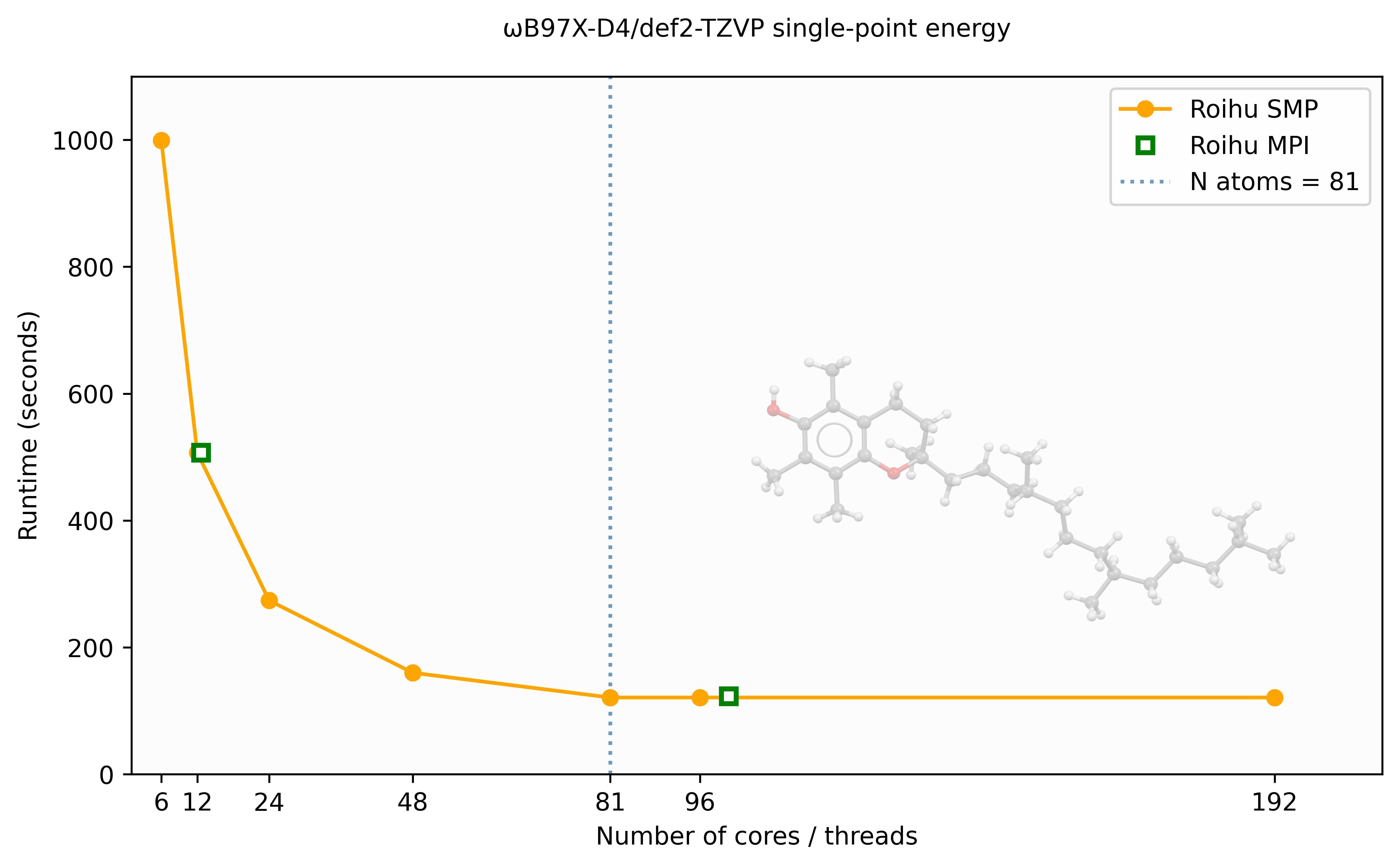
SMP (PARA_ARCH=SMP) scales well up to approximately 48 threads for this
81-atom system, after which performance levels off. The MPI (PARA_ARCH=MPI)
results show similar wall times to SMP but require significantly more memory
— approximately 15× more at 96 processes for this system.
For ridft DFT calculations on a single node, SMP is therefore generally
preferred over MPI. The scaling limit is related to the number of atoms —
larger molecules will benefit from more threads before reaching saturation.
After the job completes, check actual memory and wall time usage with:
NumForce calculations
NumForce is a tool that can be used to calculate second derivatives (molecular
Hessian) for all methods for which analytic gradients are available in
TURBOMOLE. A NumForce job spawns 3*N*2 (N = number of atoms) independent
gradient calculations. Usually it is most efficient that the single gradient
calculations are run as serial (unset PARA_ARCH). Each serial calculation is
expected to take roughly the same time, hence optimally the total number of
gradient calculations should be an integer multiple of the allocated cores.
A NumForce step in a job file:
unset PARA_ARCH
export HOSTS_FILE=$PWD/turbomole.machines
rm -f $HOSTS_FILE
srun hostname > $HOSTS_FILE
ulimit -s unlimited
kdg tmpdir
NumForce -ri -central -mfile $HOSTS_FILE > NumForce.out
References
Please quote the usage of the program package under consideration of the version number:
- TURBOMOLE V8.0, a development of University of Karlsruhe and Forschungszentrum Karlsruhe GmbH, 1989-2007, TURBOMOLE GmbH, since 2007; available from https://www.turbomole.org
- A review article should be mentioned, as well: https://doi.org/10.1063/5.0004635
- Scientific publications require proper citation of methods and procedures employed. The output headers of TURBOMOLE modules include the relevant papers.