Table of contents of user guide
Data export from virtual desktop
Your virtual desktop is completely isolated from the internet and other services for information security reasons. Data export is also restricted: only CSC can export non-sensitive results from the secure workspace when processing secondary use data. All exported results must be reported to the data permit authority Findata for risk assesment and scrutiny.
Note
Researchers are obliged to do a risk based assesment on Findata's website before exporting results and inform Findata about all exports. Findata requests researchers to deliver their results for scrutiny if the risk of identifying individuals is high.
Please ensure you reserve enough time for the export process. It may take us a few days to respond to your request and arrange an export date.
In order to export the results at the end of your analysis, you need to:
- Make sure your results do not contain any sensitive data. Read more about producing anonymous results from Findata's website and familiarize yourself with the risk based assesment for exported results;
- Do the risk based assesment with Findata's risk assesment form;
- Continue filling in the form and submit the information about the results to Findata;
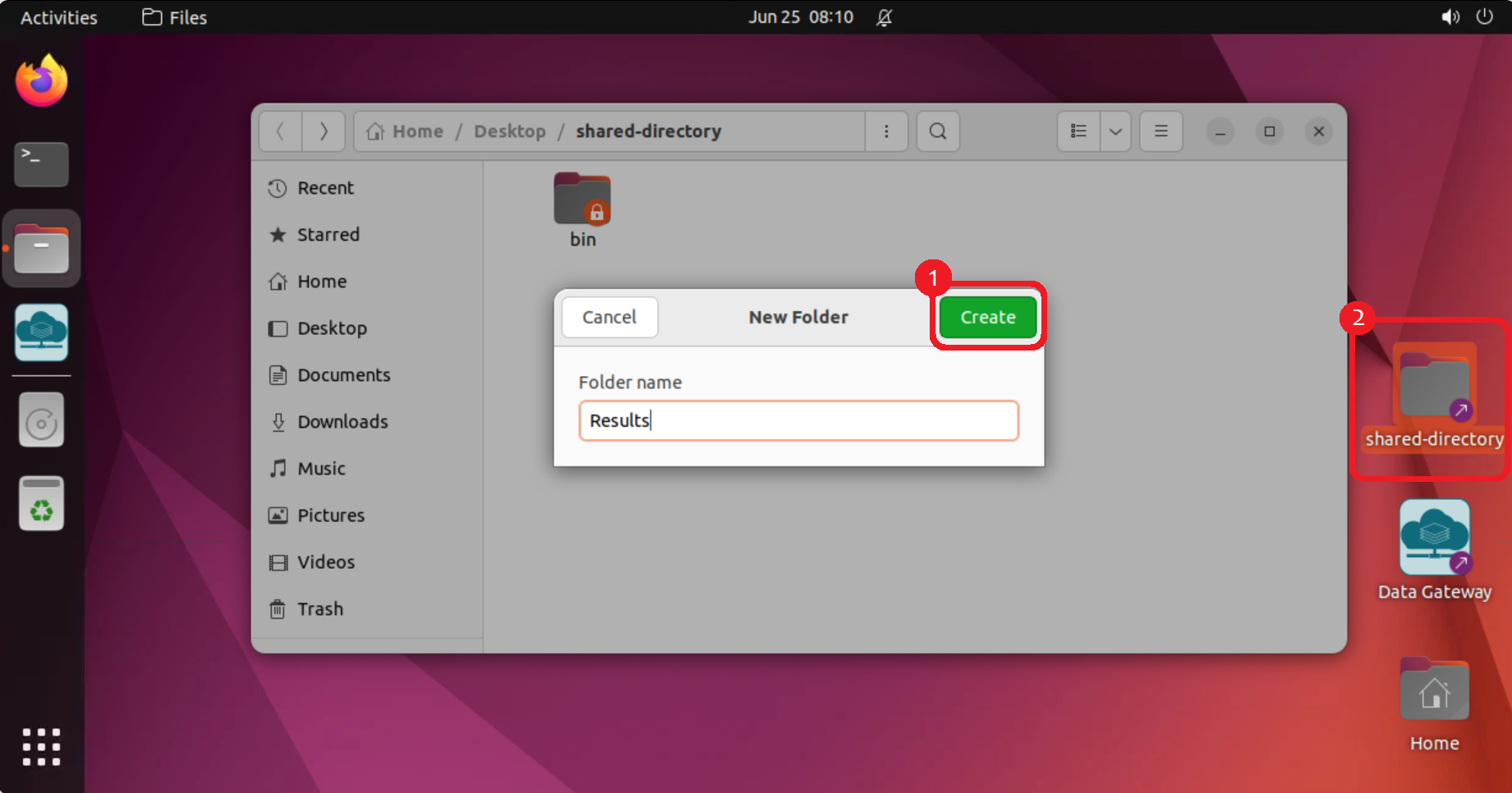
- Collect all the results into a folder on your Desktop and name it as Results;
- Place the Results folder into the shared-directory on your Desktop;
- Send a request to CSC Service Desk to export your results;
- The content of the “Results” folder will be exported on the agreed time. During the export, you will not be able to access your virtual Desktop. All the project members have to be removed from the CSC project for the duration of the data export. Afterwards, you will be added back to the CSC project, if your project is still ongoing;
- You will receive instructions on how to create a new CSC project in SD Connect, after which the Sensitive Data Support -team will share the results to you via SD Connect;
- If required by the risk based assesment, deliver the results to Findata for scrutiny following Findata's instructions.
Note
When requesting export, remember to agree on the export date with all project members, because the virtual desktops will be unavailable during the export. In addition, remember to save all your work before the export, because software and processes can be interrupted during the export.
End of data access and data deletion policies
Access to the data will be denied after the data permit expires. If you want to continue accessing the data after the original validity period ends, you need to send an amendment application to the data controller to extend the validity of the permit.
When the data permit has expired, the CSC project will be closed, and you cannot access your virtual Desktop anymore. This means that all your results must be exported before the end of the validity period. Both the project and the data will be deleted according to CSC’s data retention policy (see General Terms of Use for CSC's Services for Research and Education) and agreement with the users. As a default, inactive projects and all their data will be deleted after 90 days in accordance with the regulation.
If you are still waiting for a decision about your amendment application when the original permit expires, please contact CSC Service Desk in order to save your CSC project and data for later use. We cannot grant access to the Desktop without a valid data permit.