Table of contents of user guide
Start here: creating a CSC account and a CSC project (Academic-type)
To access CSC Sensitive Data (SD) Connect or Desktop, you first need to create a CSC project. A CSC project serves as your team’s shared workspace: all members use the same datasets and services. The project is also where you define who has access to the data, which CSC services the team can use, and what types of data will be processed in the project.
When working with sensitive research data (such as consented data or confidential data), the project needs to be created as an Academic-type CSC project.
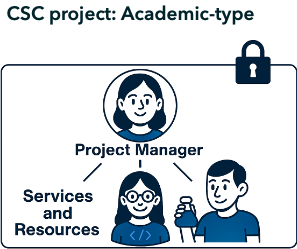
This guide explains how to get started, whether you are a project manager or a project member. The steps you need to follow depend on your role in the research team:
Project Manager
The project manager is the primary owner of the CSC project and acts as the representative of the Data Controller (typically the home organisation of the researchers). According to CSC’s Terms of Use, only group leaders and postdoctoral researchers may serve as CSC project managers. The role can be delegated to other research specialists after project creation by submitting a request to servicedesk@csc.fi.
Responsibilities include:
-
Creating and managing CSC projects in the MyCSC portal.
-
Defining data access by deciding who can join the project.
-
Define what type of data are processed (personal sensitive data, confidential data) and describe it in the Description of processing acitivity form via MYCSC portal.
-
Managing project lifetime, storage space (quota) and resources (here called Billing Units) via MyCSC portal.
-
Deciding which services are suitable for data processing and adding the services to the project via MyCSC portal.
-
Exporting data from SD Desktop (only project managers can do this).
-
Familiarizing with SD Services data retention policy.
Note
Academic-type CSC projects cannot be used for processing register data under the Finnish Act on Secondary Use of Health and Social Data.
Project Member
A project member is invited into a CSC project by the project manager. All members of the same project have equal access to project data stored in SD services.
-
All project members have equal access to the project's content (e.g. data access).
-
SD Connect: project members can upload, download and delete files same way as the project manager.
-
SD Desktop: project members can upload data and analyze it, but they can not export anything from SD Desktop. Only the project manager can export data from SD Desktop.
-
Project members can not add services via MyCSC portal.
-
Project members can apply for storage space (quota) and resources (here called Billing Units) via MyCSC portal.
Select tutorial:
Note
If you encounter any difficulties with these steps, feel free to reach out to us at servicedesk@csc.fi (subject: Sensitive Data services). We provide step-by-step online support to guide you through the process.